Lirb 的头像

Lirb.

Unity Gameplaying
P1 / 游戏策划

“我们的旅程是星辰大海”

“一个简单普通的男孩”

站点信息

文章数目: 8 篇

最近动态: 2月前

上线时间: 1690天

当前版本: v1.0.2

2024-02-20 12:44:10 星期二

Java 可变参数使用

可变参数
Java中允许将同一类中的多个同名同功能但参数个数不同的方法,封装成一个方法。
基本语法
访问修饰符 返回类型 方法名(数据类型… 形参名){
}

1
2
3
4
5
6
7
8
9
10
11
12
13
public static void main(String[] args){
sum(1, 5, 100) //返回106
sum(1, 6) //返回6
}

public static int sum(int... nums){
int res = 0;
for(int i = 0; i < nums.length; i++){
res += nums[i];
}
return res;
}// int... 表示接受的是可变参数,类型是int,即可接受多个int(0-多)
// nums 可以当作数组

使用细节
1.可变参数的实参可以为0个或任意多个
2.可变参数的实参可以为数组
3.可变参数的本质就是数组
4.可变参数可以和普通类型的参数一起放在形参列表,但必须保证可变参数在最后

1
2
public void f1(double... nums, String str)// 错误
public void f2(String str, double... nums)// 正确

5.一个形参列表中只能出现一个可变参数

1
public void f3(int... nums1, double... nums2)// 错误
阅读更多

2024-02-17 20:43:08 星期六

Java 重载(Overload)

java中允许同一个类中,多个重名的方法存在,但要求形参列表不一致
比如:System.out.println(); out 是 PrintStream类型

重载的好处
1.减轻了起名的麻烦
2.减轻了记名的麻烦

1
2
3
4
5
6
7
8
9
10
11
12
13
14
//令方法:calculate
//下面四个calculate构成重载
public int calculate(int n1, int n2){
return n1 + n2;
}
public double calculate(int n1, double n2){
return n1 + n2;
}
public double calculate(double n1, int n2){
return n1 + n2;
}
public int calculate(int n1, int n2, int n3){
return n1 + n2 + n3;
}

细节:
1.方法名:必须相同
2.形参列表:必须不同(形参类型或个数或顺序必须至少有一个不一样)
3.返回类型:无要求(跟返回类型无关)

1
2
3
4
5
6
7
public int calculate(int n1, int n2, int n3){
return n1 + n2 + n3;
}
//不构成重载,因为和返回类型无关
public void calculate(int n1, int n2, int n3){
int n = n1+n2+n3;
}
阅读更多

2024-02-12 12:15:00 星期一

Java三元运算符

基本语法:
条件表达式 ? 表达式1 :表达式2;
1.如果条件表达式为true,运算后的结果是表达式1;
2.如果条件表达式为false,运算后的结果是表达式2;

1
2
3
int a = 10;
int b = 99;
int result = a>b ? a++ :b--;//result = 99,但是a = 10, b = 98

使用细节
表达式1和表达式2要为可以赋给接收变量的类型(或可以自动转换)

1
2
3
4
int a = 3;
int b = 8;
int c = a > b ? 1.1 : 3.4;//错误的
double d = a > b ? a : b + 3;//可以的

三元运算符可以转换成if–else 语句
实现三个数的最大值

1
int max = (n1 > n2 ? n1 : n2) > n3 ? (n1 > n2 ? n1 : n2) : n3;
阅读更多

2024-02-11 17:37:49 星期天

Java数据类型转换的细节

在Java中,有多种类型的数据混合运算时,系统首先自动将所有数据转换成容量最大的那种数据类型,然后再计算

1
2
3
4
int n1 = 10;
float d1 = n1 + 1.1;//错误,n1 + 1.1 => 结果是double
double d1 = n1 + 1.1;//对
float d1 = n1 + 1.1f;//对,将 1.1 double转float

把精度(容量)大的数据类型赋值给精度(容量)小的数据类型就会报错,反之就会进行自动类型转换。

1
int n2 = 1.1;//错误 double -> int

(byte, short)和 char之间不会相互自动转换

t1
1
2
3
4
byte b1 = 10;//对,-128 - 127
int n2 = 1;
byte b2 = n2;//错误,如果是变量赋值,判断类型
char c1 = b1;//错误,原因 byte 不能自动转换成 char

byte,short,char 他们三者可以计算,在计算时首先转换为int类型

1
2
3
4
5
byte b2 = 1;
short s1 = 1;
short s2 = b2 + s1;//错,b2 + s1 => int
int s2 = b2 + s1;
byte b4 = b2 + b3;//错, b2 + b3 => int

boolean 不参与转换

表达式结果类型自动提升为操作数中最大的类型

1
2
3
4
5
byte b4 = 1;
short s3 = 100;
int num200 = 1;
double num300 = 1.1;
double num500 = b4 + s3 + num200 + num300;
阅读更多

2024-02-08 15:09:44 星期四

Dos指令入门

Disk Operating System 磁盘操作系统
常用dos指令
1.查看当前目录有什么

1
dir    dir F:\blog\source

2.切换到其他盘下

1
cd     cd /D c:

3.切换到当前盘的其他目录下(相对路径和绝对路径)

1
cd F:\blog\source    cd ..\..\blog\source

4.切换到上一级

1
cd ..

5.切换到根目录

1
cd \

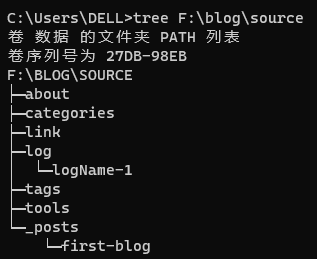
6.查看指定目录下所有的子级目录

1
tree F:\blog\source
t1 7.清屏
1
cls
8.退出dos
1
exit
还有一些使用较少的dos指令
1
md 创建目录
1
rd 删除目录
1
copy 拷贝文件
1
del 删除文件
1
echo 输入内容到文件  type (跟echo差不多)
1
move 剪切
阅读更多

2024-02-07 20:53:04 星期三

启动日志

日志新建代码

1
hexo new page --path log/logName "logName"

博客新建代码

1
hexo new "Name"

更新记录

CHANGELOG

22 条更新 2026 年

少多
活跃 12 天最近 2026-10-02

点击亮色方块查看当天更新

查看本年日志
  • 网站改版

    新增独立更新日志与年份切换

  • 历史部署

    历史部署:feat(site): publish pixel theme and interactive toolbox

  • 历史部署

    历史部署:Site updated: 2026-08-14 21:58:40

  • 历史部署

    历史部署:Site updated: 2026-08-14 21:49:25

  • 历史部署

    历史部署:Site updated: 2026-08-14 15:46:44

  • 历史部署

    历史部署:Site updated: 2026-08-14 15:23:26

  • 历史部署

    历史部署:Site updated: 2026-08-14 14:56:59

  • 文章发布

    让Boss与玩家真正“打起来”——《漫威蜘蛛侠2》Boss战设计分析

  • 历史部署

    历史部署:Site updated: 2026-07-29 18:34:53

  • 历史部署

    历史部署:Site updated: 2026-07-27 09:06:17

  • 历史部署

    历史部署:Merge main branch for Pages deployment

  • 历史部署

    历史部署:Site updated: 2026-07-26 15:11:12

  • 历史部署

    历史部署:Site updated: 2026-07-26 15:44:10

  • 历史部署

    历史部署:Site updated: 2026-07-04 10:02:55

  • 历史部署

    历史部署:Site updated: 2026-05-17 10:31:06

  • 历史部署

    历史部署:Site updated: 2026-05-14 09:52:35

  • 历史部署

    历史部署:Site updated: 2026-05-14 09:47:30

  • 历史部署

    历史部署:Site updated: 2026-05-13 11:10:05

  • 历史部署

    历史部署:Site updated: 2026-05-12 10:31:20

  • 历史部署

    历史部署:Site updated: 2026-05-12 10:53:10

  • 历史部署

    历史部署:Site updated: 2026-05-06 theme redesign

  • 历史部署

    历史部署:Site updated: 2026-05-06 11:31:01

构建时记录变化,上传后更新。文章同日修改、网站同日改版各合并计次;历史部署单独标注。

Built with Hexo

Lirb. / PIXEL JOURNAL