效果展示:
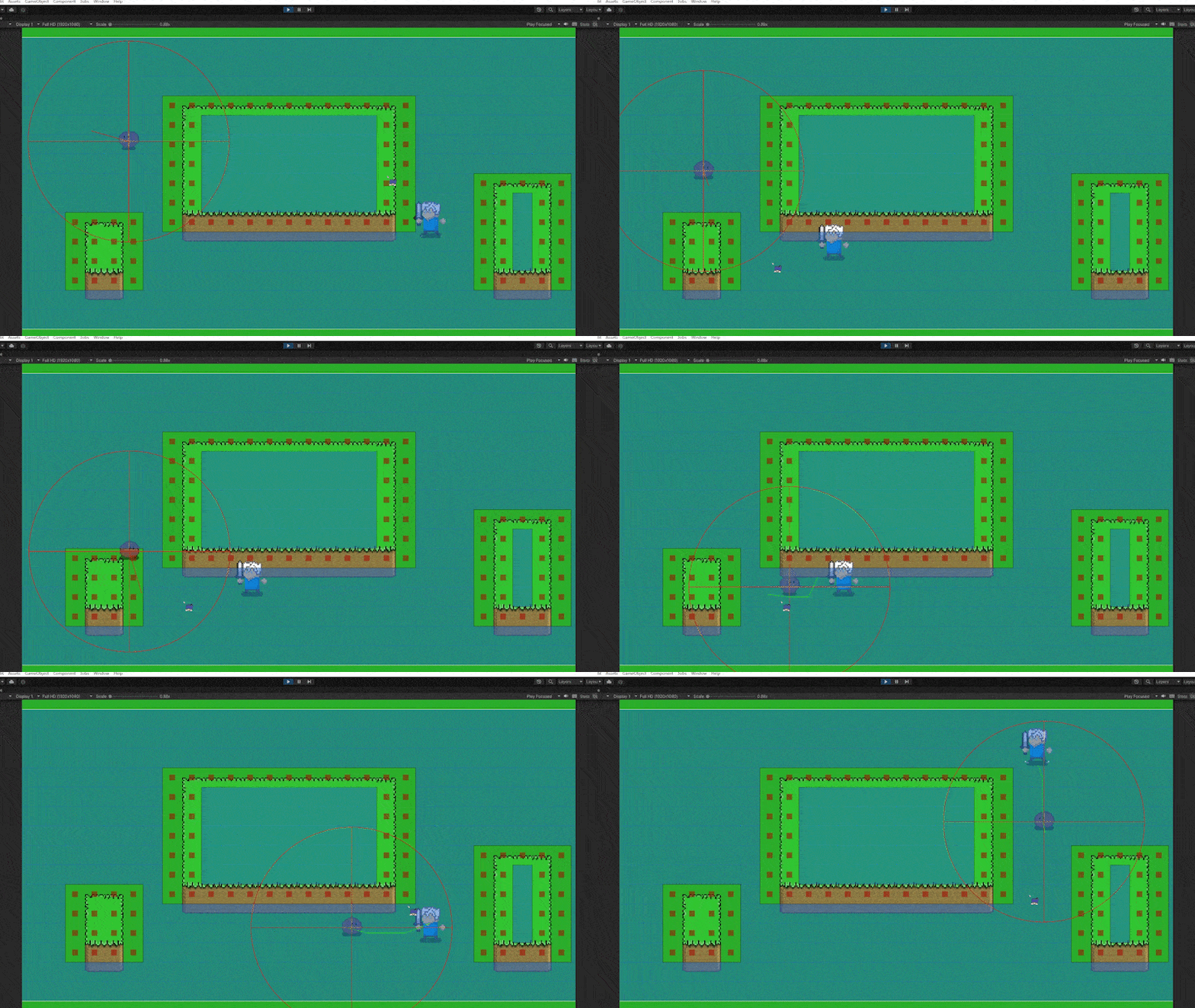
敌人自动寻路AI:
自动寻路其实就是以敌人为中心,向四周限定范围和角度寻找随机位置,最后让敌人移动到该位置;以此为循环,直到此状态结束。
1.制定随机点
1
2
3
4
5
6
7
8
9
| void ChooseEndPoinnt()
{
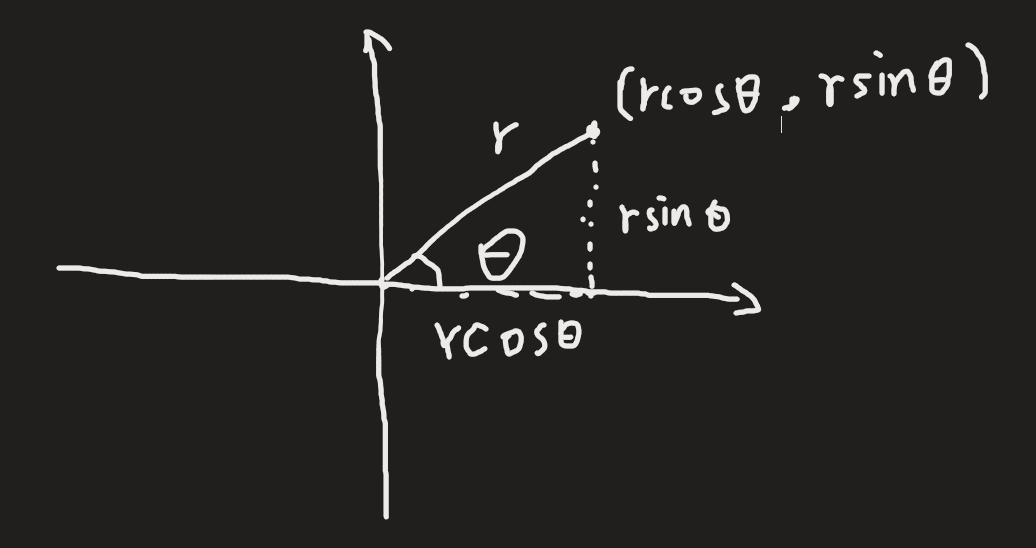
float randomAngle = Random.Range(0,360) * Mathf.Deg2Rad;
float randomRadius = Random.Range(2,5);
endPosition = rb.position + new Vector(Mathf.Cos(randomAngle), Mathf.Sin(randomAngle)) * randomRadius
}
|
原理
2.移动
1
2
3
4
5
6
7
8
9
10
11
12
13
14
15
16
17
18
| void MoveTowardsEndPosition()
{
Vector2 direction = (endPosition - rb.position).normalized;
float distance = Vector2.Distance(rb.position, endPosition);
if (distance < stopThreshold)
{
rb.velocity = Vector2.zero;
rb.position = endPosition;
isMoving = false;
}
else
{
rb.velocity = direction * wanderSpeed;
}
}
|
人物移动这里是使用了velocity,主要是为了之后能检测敌人的运动方向等数值。
移动还可以使用MovePosition()或者是AddForce()
为了节省游戏性能,不能一直调用ChooseEndPoinnt()方法,所以在FixedUpdate中加载一个计时器去定时调用此函数。
1
2
3
4
5
6
7
8
9
10
11
12
13
14
15
16
17
18
19
20
21
22
23
| protected void FixedUpdate()
{
if (isWandering)
{
timer += Time.deltaTime;
if (timer >= wanderIntervalTime && !isMoving)
{
timer = 0f;
ChooseEndPoint();
isMoving = true;
MoveTowardsEndPosition();
}
if (isMoving)
{
MoveTowardsEndPosition();
}
}
}
|
此时,敌人巡逻逻辑基本上实现。
优化:
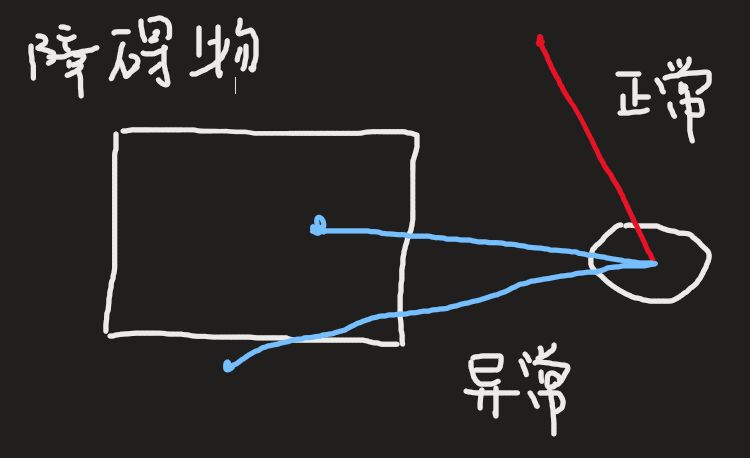
有时,地图中会有一些障碍物,而如果随机位置刚好落在障碍物上,敌人会一直往障碍物上撞,导致无法退出MoveTowardsEndPosition()函数。
此时,我们就需要一个射线检测,看我们随机出来的位置是否会在障碍物上,并且,由于是射线检测,还能检测出移动的方向是否会经过障碍物
1
2
3
4
5
6
7
8
9
10
11
12
13
14
15
| void ChooseEndPoint()
{
float wanderAngle = Random.Range(0, 360) * Mathf.Deg2Rad;
float wanderRadius = Random.Range(2, 5);
Vector2 tempVecter = rb.position + new Vector2(Mathf.Cos(wanderAngle), Mathf.Sin(wanderAngle)) * wanderRadius;
RaycastHit2D wall = Physics2D.Raycast((Vector2)transform.position, tempVecter - rb.position, (tempVecter - rb.position).magnitude, GameStaticData.wallLayer);
if (wall)
{
Debug.DrawLine(transform.position, wall.point, Color.blue);
tempVecter = rb.position;
ChooseEndPoint();
return;
}
endPosition = tempVecter;
}
|
1
| RaycastHit2D wall = Physics2D.Raycast((Vector2)transform.position, tempVecter - rb.position, (tempVecter - rb.position).magnitude, GameStaticData.wallLayer);
|
这是一个射线检测方法,当wall有经过一个Layer为wallLayer的物体时,会返回此函数,重新随机位置,直到找到正确的位置。
敌人追击玩家:
1.检测玩家
首先,需要一个方法去检测附近是否有玩家需要追击。
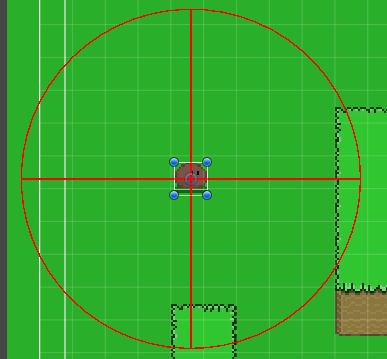
这里,我使用Physics2D.OverlapCircleAll去检测玩家
1
2
3
4
5
6
7
8
9
10
11
12
13
14
15
16
17
18
19
20
21
22
23
24
25
26
27
| void DetectPlayer()
{
List<Collider2D> obj = Physics2D.OverlapCircleAll(center.position, range).ToList();
List<Collider2D> player = obj.Where(x => x.gameObject.layer == GameStaticData.playerLayer).ToList();
if (player.Count > 0)
{
for (int i = 0; i < player.Count; i++)
{
if (player[i].gameObject.layer == GameStaticData.playerLayer)
{
isWandering = false;
timer = 0f;
endPosition = transform.position;
StartPath(target);
Move();
}
}
}
else
{
}
}
|
可以用OnDrawGizmos去可视化检测范围
1
2
3
4
5
| private void OnDrawGizmos()
{
Gizmos.color = Color.red;
Gizmos.DrawWireSphere(center.position, range);
}
|
效果图
2.追逐玩家寻路算法:
由于敌人在追逐玩家的时候会遇到许多障碍物,为了敌人能够避开障碍物,这里采用了A*算法。
关于A*算法:
A*算法其实是BFS(广度优先搜索)算法的升级版,是BFS加上启发式函数所得到的进阶版。这里,我们主要是讨论在网格地图中的启发式算法;一般采用曼哈顿距离:
H(n) = D * (abs ( n.x – goal.x ) + abs ( n.y – goal.y ) )

但是在Unity中,我们没必要去自己写一套A算法,现在有许多A * 算法的插件,比如此案例中使用的是一个免费A插件
下载链接:A*插件
下载其中的免费版就行
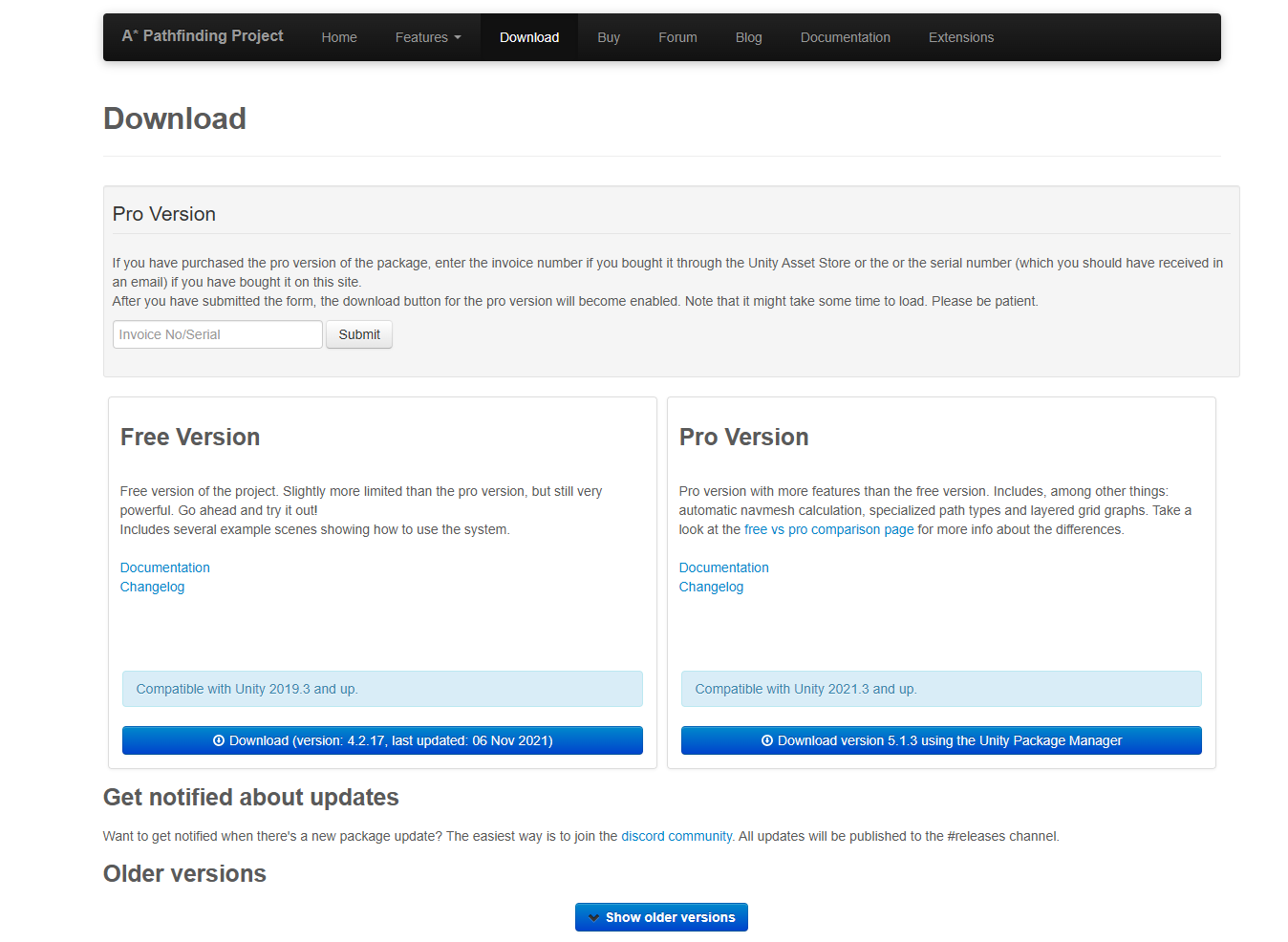
将下载好的UnityPackage传入项目中
生成寻路网格:
新建空物体:
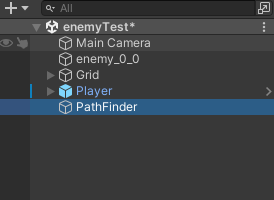
配置参数:
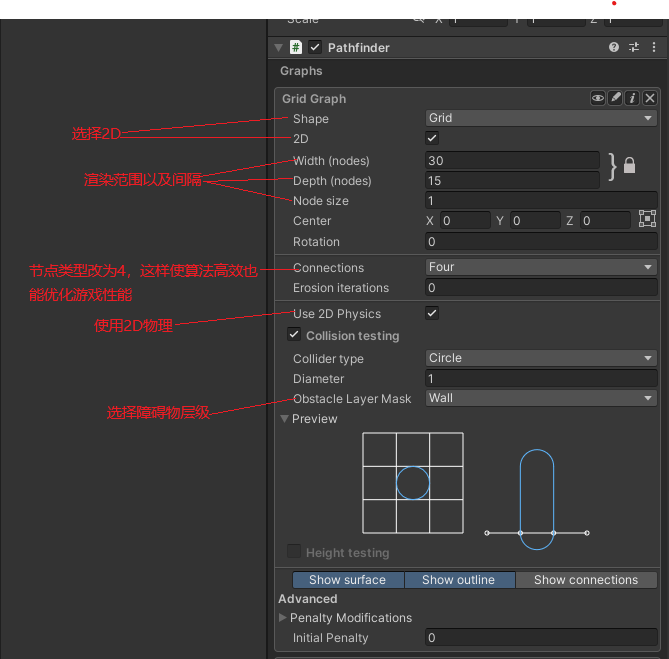
将Debug中的Path Logging改为Only Error

点击Scan,就会有生成的效果图
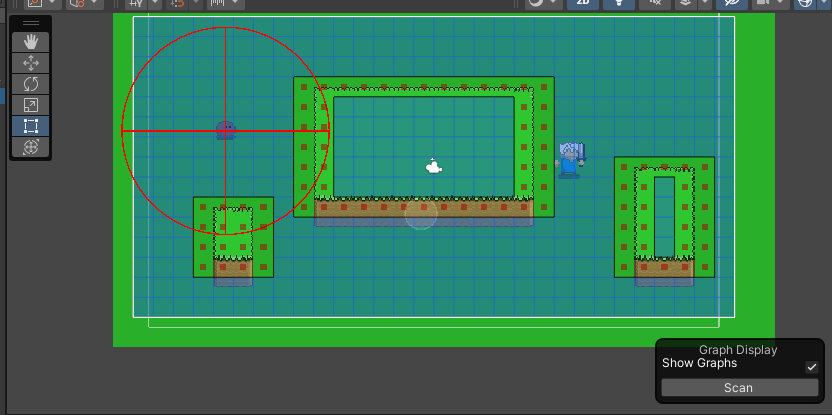
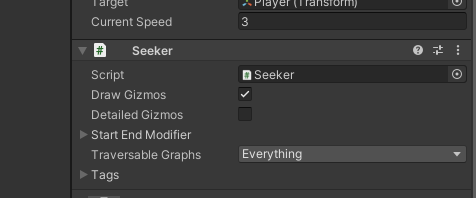
接下来,给敌人添加寻路组件:
注意,只需添加Seeker即可
在自己的代码中使用A*算法:
官方文档中有个寻路demo可以参考
演示demo
回到我们的代码,基本上也同demo中的一样
隔一段时间计算路径
1
2
3
4
5
6
7
8
9
10
| public void StartPath(Transform target)
{
if (Time.time > lastRepath + repathRate && seeker.IsDone())
{
lastRepath = Time.time;
seeker.StartPath(transform.position, target.position, OnPathComplete);
}
}
|
路径完成回调
1
2
3
4
5
6
7
8
9
10
11
12
13
14
15
16
17
18
19
20
21
| public void OnPathComplete(Path p)
{
Debug.Log("计算出一条路径。是否出现错误?" + p.error);
p.Claim(this);
if (!p.error)
{
if (path != null) path.Release(this);
path = p;
currentWaypoint = 0;
}
else
{
p.Release(this);
}
}
|
人物移动
1
2
3
4
5
6
7
8
9
10
11
12
13
14
15
16
17
18
19
20
21
22
23
24
25
26
27
28
29
30
31
32
33
34
35
36
37
38
39
40
41
42
43
44
45
46
| public void Move()
{
if (path == null) return;
reachedEndOfPath = false;
float distanceToWaypoint;
while (true)
{
distanceToWaypoint = Vector3.Distance(transform.position, path.vectorPath[currentWaypoint]);
if (distanceToWaypoint < nextWaypointDistance)
{
if (currentWaypoint + 1 < path.vectorPath.Count)
{
currentWaypoint++;
}
else
{
reachedEndOfPath = true;
break;
}
}
else
{
break;
}
}
var speedFactor = reachedEndOfPath ? Mathf.Sqrt(distanceToWaypoint / nextWaypointDistance) : 1f;
Vector3 dir = (path.vectorPath[currentWaypoint] - transform.position).normalized;
Vector3 velocity = dir * currentSpeed * speedFactor;
rb.velocity = velocity;
isWandering = true;
}
|
完整代码展示:
1
2
3
4
5
6
7
8
9
10
11
12
13
14
15
16
17
18
19
20
21
22
23
24
25
26
27
28
29
30
31
32
33
34
35
36
37
38
39
40
41
42
43
44
45
46
47
48
49
50
51
52
53
54
55
56
57
58
59
60
61
62
63
64
65
66
67
68
69
70
71
72
73
74
75
76
77
78
79
80
81
82
83
84
85
86
87
88
89
90
91
92
93
94
95
96
97
98
99
100
101
102
103
104
105
106
107
108
109
110
111
112
113
114
115
116
117
118
119
120
121
122
123
124
125
126
127
128
129
130
131
132
133
134
135
136
137
138
139
140
141
142
143
144
145
146
147
148
149
150
151
152
153
154
155
156
157
158
159
160
161
162
163
164
165
166
167
168
169
170
171
172
173
174
175
176
177
178
179
180
181
182
183
184
185
186
187
188
189
190
191
192
193
194
195
196
197
198
199
200
201
202
203
204
205
206
207
208
209
210
211
212
213
214
215
216
217
218
219
220
221
222
223
224
225
226
227
228
229
230
231
| using Pathfinding;
using System.Collections;
using System.Collections.Generic;
using System.Data.Common;
using System.Linq;
using UnityEngine;
public enum EnemyType
{
little,middle,big
}
public abstract class EnemyFather: MonoBehaviour
{
[HideInInspector]public Rigidbody2D rb;
[Header("敌人类型")]
public EnemyType enemyType;
[Header("漫游")]
public float wanderIntervalTime = 3.0f;
public float wanderSpeed = 2.0f;
private float timer = 0f;
private Vector2 endPosition;
private bool isMoving = false;
public float stopThreshold = 0.01f;
[Header("检测玩家")]
private bool isWandering;
public Transform center;
public float range;
[Header("目标")]
public Transform target;
[Header("A*寻路")]
[HideInInspector] public Seeker seeker;
[HideInInspector] public Path path;
[HideInInspector] public int currentWaypoint = 0;
[HideInInspector] public bool reachedEndOfPath;
[HideInInspector] public float nextWaypointDistance = 3f;
[HideInInspector] public float repathRate = 0.5f;
[HideInInspector] public float lastRepath = float.NegativeInfinity;
[HideInInspector] public bool isPathRefresh;
public float currentSpeed = 3.0f;
protected void Start()
{
rb = GetComponent<Rigidbody2D>();
seeker = GetComponent<Seeker>();
isWandering = true;
ChooseEndPoint();
}
protected void Update()
{
DetectPlayer();
}
protected void FixedUpdate()
{
Debug.DrawLine(transform.position, endPosition, Color.red);
if (isWandering)
{
timer += Time.deltaTime;
if (timer >= wanderIntervalTime && !isMoving)
{
timer = 0f;
ChooseEndPoint();
isMoving = true;
MoveTowardsEndPosition();
}
if (isMoving)
{
MoveTowardsEndPosition();
}
}
}
#region 敌人检测
void DetectPlayer()
{
List<Collider2D> obj = Physics2D.OverlapCircleAll(center.position, range).ToList();
List<Collider2D> player = obj.Where(x => x.gameObject.layer == GameStaticData.playerLayer).ToList();
if (player.Count > 0)
{
for (int i = 0; i < player.Count; i++)
{
if (player[i].gameObject.layer == GameStaticData.playerLayer)
{
isWandering = false;
timer = 0f;
endPosition = transform.position;
StartPath(target);
Move();
}
}
}
else
{
}
}
#endregion
#region 敌人巡逻
void ChooseEndPoint()
{
float wanderAngle = Random.Range(0, 360) * Mathf.Deg2Rad;
float wanderRadius = Random.Range(2, 5);
Vector2 tempVecter = rb.position + new Vector2(Mathf.Cos(wanderAngle), Mathf.Sin(wanderAngle)) * wanderRadius;
RaycastHit2D wall = Physics2D.Raycast((Vector2)transform.position, tempVecter - rb.position, (tempVecter - rb.position).magnitude, GameStaticData.wallLayer);
if (wall)
{
Debug.DrawLine(transform.position, wall.point, Color.blue);
tempVecter = rb.position;
ChooseEndPoint();
return;
}
endPosition = tempVecter;
}
void MoveTowardsEndPosition()
{
Vector2 direction = (endPosition - rb.position).normalized;
float distance = Vector2.Distance(rb.position, endPosition);
if (distance < stopThreshold)
{
rb.velocity = Vector2.zero;
rb.position = endPosition;
isMoving = false;
}
else
{
rb.velocity = direction * wanderSpeed;
}
}
#endregion
#region A*寻路方法
public void StartPath(Transform target)
{
if (Time.time > lastRepath + repathRate && seeker.IsDone())
{
lastRepath = Time.time;
seeker.StartPath(transform.position, target.position, OnPathComplete);
}
}
public void Move()
{
if (path == null) return;
reachedEndOfPath = false;
float distanceToWaypoint;
while (true)
{
distanceToWaypoint = Vector3.Distance(transform.position, path.vectorPath[currentWaypoint]);
if (distanceToWaypoint < nextWaypointDistance)
{
if (currentWaypoint + 1 < path.vectorPath.Count)
{
currentWaypoint++;
}
else
{
reachedEndOfPath = true;
break;
}
}
else
{
break;
}
}
var speedFactor = reachedEndOfPath ? Mathf.Sqrt(distanceToWaypoint / nextWaypointDistance) : 1f;
Vector3 dir = (path.vectorPath[currentWaypoint] - transform.position).normalized;
Vector3 velocity = dir * currentSpeed * speedFactor;
rb.velocity = velocity;
isWandering = true;
}
public void OnPathComplete(Path p)
{
Debug.Log("计算出一条路径。是否出现错误?" + p.error);
p.Claim(this);
if (!p.error)
{
if (path != null) path.Release(this);
path = p;
currentWaypoint = 0;
}
else
{
p.Release(this);
}
}
#endregion
private void OnDrawGizmos()
    {
        Gizmos.color = Color.red;
        Gizmos.DrawWireSphere(center.position, range);
    }
}
|

评论区
欢迎你留下宝贵的意见,昵称输入QQ号会显示QQ头像哦~